Personalize the front
Enter the birthday name and age, then pick a color palette. Add a photo if you would like a portrait on the bag.
PRINTABLE PARTY FAVORS
Put a name, age and optional photo on a birthday chip bag wrapper. Preview your design and download a PDF to print at home.
Measure around the snack and add 12 mm for the seam. Allow 10 mm at the top and bottom.
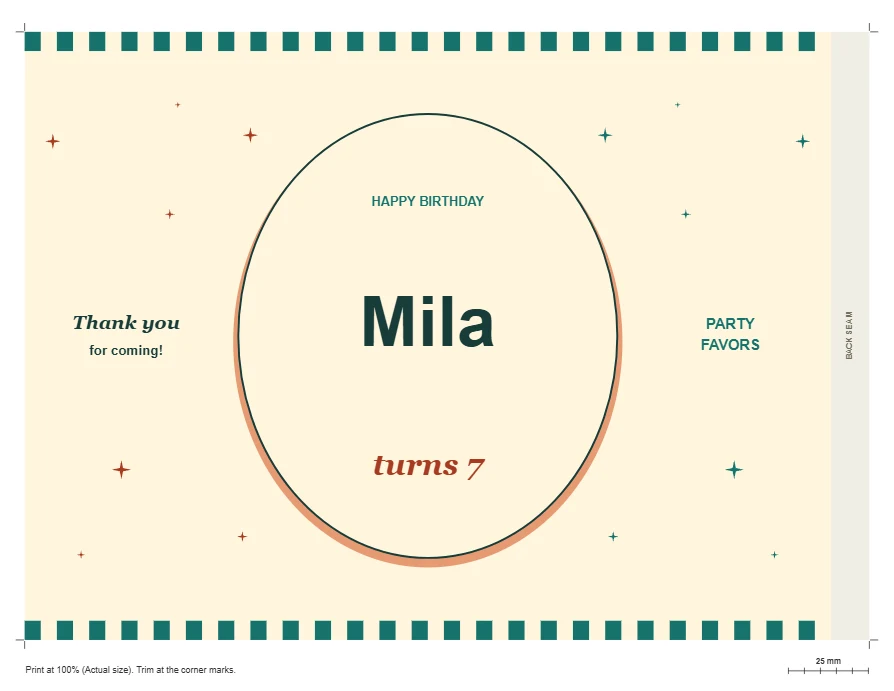
Print at 100% or Actual size. Measure the 25 mm line and test one wrapper on your sealed snack.
Enter the birthday name and age, then pick a color palette. Add a photo if you would like a portrait on the bag.
Look over the name, age and picture in the preview. Select the paper loaded in your printer, either US Letter or A4.
Download the PDF and print one copy at Actual size (100%). Wrap it around a sealed snack, bring the back edges together and check the fit before printing the rest.
See the birthday guest’s details on the front of the wrapper as you type.
Change the palette across the design to suit the party.
Add a personal picture or use the illustrated birthday design on its own.
See where the front artwork and back overlap fall on the printed sheet.
Choose a sheet size and download a PDF with one wrapper per page.
The artwork is prepared on your device. Your party details and photo stay in your browser.
Print one sheet on plain paper at 100%. Center the birthday design on the front of the unopened snack, fold the sides around it, and check the overlap at the back. Once the fit looks right, use your chosen paper for the party copies.
If a portrait looks soft on paper, check the original photo with the Image DPI Checker. To bring a face closer to the center before uploading it, use the photo cropper.
Yes. Enter a name and age and choose a palette. The birthday illustration can stand on its own.
The PDF contains one landscape wrapper on the sheet size you select. Set the number of copies in your print dialog.
Match the PDF and printer paper sizes, then choose Actual size or 100%. A setting such as Fit to page can change the wrapper dimensions.
Fit depends on the shape and fullness of the sealed snack. Fold one test print around it and check that the back edges overlap before making the rest.
Yes. Enter the details in your mobile browser, select an optional photo and save the PDF. You can print the file later from another device.